Spectrum WiFi 6 Router: Settings, Reset Button and Lights
How to change the Wi-Fi name and password on a Spectrum WiFi 6 router, what the reset button times do, and what the light colours mean.
Spectrum’s WiFi 6 router user guide does not give a router admin address or a default admin login. Spectrum says you change the network name and password on Spectrum.net or in the My Spectrum app. The label on the router carries the default Wi-Fi name (it starts with SpectrumSetup-) and Wi-Fi password.
How to change the Wi-Fi name and password
- Find the sticker on the router. It shows the default Wi-Fi name, which begins with SpectrumSetup-, and the printed Wi-Fi password.
- Connect a phone or computer to that Wi-Fi network.
- Sign in on Spectrum.net or open the My Spectrum app with your Spectrum account.
- Change the network name and password there. Spectrum suggests a unique name and a password with letters and numbers.
- Reconnect your devices to the new network name with the new password.
Reset button on the side of the router
| Hold the button | What happens | Settings lost? |
|---|---|---|
| 4 to 14 seconds | Reboots the router | No, personal settings are kept |
| 15 seconds or more | Factory reset to defaults | Yes |
Source: Spectrum WiFi 6 Router User Guide (version 13). Note that this differs from the modem guides, where 10 seconds is a factory reset.
Lights, ports and problems
- The light is pulsing red
- Spectrum lists red pulsing as a connectivity problem with no internet. Check the cable from the modem to the Internet port, restart the modem, then the router.
- The light alternates red and blue or green
- The router is updating its firmware and restarts by itself. Leave it alone.
- The light alternates red and white
- Spectrum lists this as the device overheating. Move it somewhere open and let it cool.
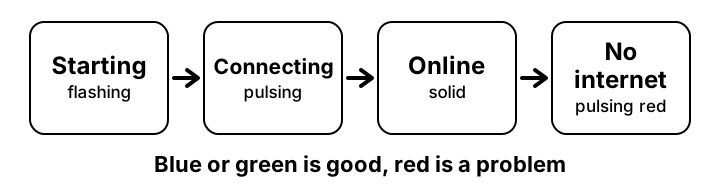
- Blue or green is flashing or pulsing
- Flashing means starting up. Pulsing means connecting to the internet. Solid means connected.
- Which port goes to the modem?
- The Internet (WAN) port. The Ethernet (LAN) ports are for your computer, game console or printer. The guide lists three gigabit LAN ports.
- I want the router admin page like on other brands
- Spectrum’s guide does not describe one. Use Spectrum.net or the My Spectrum app. Other routers behind a Spectrum modem have their own address, see how to find your router IP.
Questions people ask about Spectrum WiFi 6 router
- Is the reset time the same as the Spectrum modem?
- No. On this router 4 to 14 seconds reboots it and 15 seconds or more is a factory reset. The SONU and D3.1 MDU modems use 4 and 10 seconds. See the <a href="/router/spectrum-modem-reset">modem reset page</a>.
- Is this page about the modem?
- No. For the SONU and D3.1 MDU modems see <a href="/router/spectrum-modem-guide">Spectrum modem help</a>.
Related pages
- Find your router IP
- Login not working
- Forgot password and reset
- Change Wi-Fi password
- Default IP list
- Security checklist