Spectrum Modem Help: Lights, Reset, Ports and Router Login
Spectrum SONU and D3.1 MDU modems explained: ports, lights, reset button, power and what to do about your router login.
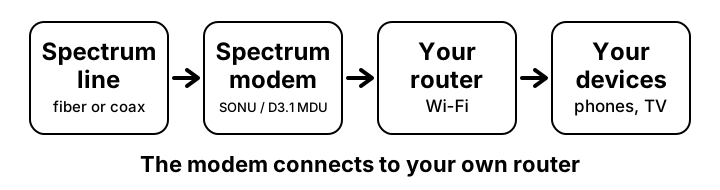
Spectrum supplies two modems that people often search for: the SONU (a 10G fiber modem with phone ports) and the D3.1 MDU modem (DOCSIS 3.1, for apartment buildings). They connect to your own router. They are not Wi-Fi routers. This page collects what Spectrum’s user guides say, with links to the detail pages.
Quick facts about Spectrum modem help
- SONU connection
- 10G EPON fiber
- D3.1 MDU connection
- Coax cable, DOCSIS 3.1
- Phone ports
- Voice 1 and Voice 2 (two phone lines)
- Reset button
- Hold 4 s to restart, 10 s to factory reset
- Power
- SONU: 12 V adapter. D3.1 MDU: 54 V adapter. Use only the adapter supplied
- Support
- spectrum.net/support or (800) 495-6590
Setting up the connection
- Plug the supplied power adapter into the modem and the wall.
- SONU: use the 10G Ethernet port for your router. The 1G port is for an external phone adapter only. D3.1 MDU: connect the coax cable, and use the Ethernet port (2.5G on the rear panel) for your router.
- Connect analog phones or a DECT base to Voice 1 and 2 once Spectrum has switched phone service on.
- Wait for the status light to turn solid blue. See the light guide.
- Open your own router’s admin page to set Wi-Fi. If you do not know its address, use find your router IP.
Common questions
- Red or white light
- See what each light means.
- Need to restart it
- Hold the reset button for 4 seconds. See the reset guide.
- Where is the modem login page?
- The guides give no login address or default password for these modems. Spectrum manages them. Your own router has an address, often 192.168.1.1 or 192.168.0.1, but check the label on it.
- Will it work in any room?
- The guide says to keep it between 0°C and 40°C (32°F to 104°F) and below 3962 m (13,000 ft).
- I need a battery backup
- The SONU has a battery port for an eBBU. On the D3.1 MDU the guide says to contact customer care if a backup battery is needed.
Questions people ask about Spectrum modem help
- Is this a Wi-Fi router?
- No. It is a modem. The Wi-Fi comes from your own router or a Spectrum device that the user guides here do not cover.
Related pages
- Find your router IP
- Login not working
- Forgot password and reset
- Change Wi-Fi password
- Default IP list
- Security checklist